Work Packaging Overview
InEight Plan helps you manage the Advanced Work Packaging (AWP) process during project planning and execution. With a structured hierarchy of work packages, you can define how work will be performed, coordinate engineering and construction activities, and give field crews the information they need to execute work efficiently.
What is Advanced Work Packaging?
Advanced Work Packaging (AWP) is a project delivery method that helps improve construction productivity by planning work before it reaches the field.
The goal of AWP is to align engineering, procurement, and construction activities around a shared construction strategy so you can execute work safely, efficiently, and with fewer constraints. Rather than treating engineering and construction as separate processes, AWP connects them through a series of work packages that support planning, coordination, and execution.
A key concept in AWP is the Path of Construction (PoC), which defines the best sequence for building the physical components of a project. The Path of Construction provides the foundation for how work packages are organized and executed.
AWP includes WorkFace Planning (WFP), which focuses on confirming that all information, materials, equipment, and resources needed to perform work are available before crews begin work in the field.
How work packaging is organized in Plan
Plan supports the AWP process by providing tools to create and manage a hierarchy of work packages.
The hierarchy typically includes:
-
Construction Work Areas (CWAs)
-
Construction Work Packages (CWPs)
-
Installation Work Packages (IWPs)
Each level breaks the project into smaller and more manageable scopes of work while keeping everything aligned with the overall construction strategy.
Construction Work Areas
Construction Work Areas divide a project into logical geographic or physical areas. Depending on the project, a work area for example might represent:
-
A building
-
A floor
-
A station
-
A roadway segment
-
A plant area
Work areas provide the organizational structure used to plan and track construction activities throughout the project.
Construction Work Packages
Construction Work Packages define a specific scope of construction work within one or more work areas. A CWP is an executable construction deliverable that sets the scope, sequence, and execution strategy for part of the project.
CWPs are typically organized around a discipline, system, or major scope of work, such as:
-
Civil work
-
Underground utilities
-
Structural steel
-
Electrical systems
-
Piping systems
As part of the planning process, CWPs help construction teams define work boundaries, establish priorities, coordinate required resources, and communicate construction requirements to engineering and procurement teams.
CWPs connect front-end planning and field execution. They provide the framework to develop IWPs and support alignment across engineering, procurement, and construction activities.
Installation Work Packages
Installation Work Packages are the primary deliverable of WorkFace Planning.
An IWP is a detailed execution package that organizes the information, materials, tools, equipment, and resources required for a crew to perform a specific scope of work. IWPs are typically developed from a Construction Work Package and represent a smaller, more focused portion of work intended for near-term execution.
By organizing work at the crew level, IWPs help you identify and address constraints before work begins, allowing crews to spend more time installing work and less time waiting for information, materials, or resources.
Connecting engineering and construction
Successful AWP depends on close coordination between engineering and construction teams. To support this process, Plan integrates with InEight Design.
Engineering teams create Engineering Work Packages (EWPs) in Design. An EWP contains the engineering deliverables needed to support construction planning and execution, such as:
In Plan, you can associate EWPs with CWPs to ensure engineering deliverables are aligned with the construction sequence and execution strategy.
This alignment helps project teams:
-
Establish a shared construction plan
-
Coordinate engineering and construction priorities
-
Verify engineering deliverables are available when needed
-
Support procurement and material planning activities
-
Identify and address constraints earlier in the project lifecycle
By connecting engineering deliverables to construction work packages, teams can better prepare work before it reaches the field and improve overall project execution.
From work packages to daily execution
As work packages become ready for execution, Plan helps you transition planning information directly into daily field activities.
From an IWP, you can create an InEight Progress daily plan with the Daily Plan Wizard. The wizard copies selected work package information into a new daily plan, reducing duplicate data entry and helping field crews work from the latest planning information. Depending on the information included in the work package, you can transfer items such as:
You can then complete the daily plan in Progress, where planners and field supervisors add planned hours, planned quantities, safety information, toolbox talks, notes, issues, and productivity targets before they release the work for execution.
This integration helps maintain continuity between work packaging and field execution. Construction planning performed at the CWP and IWP levels can flow directly into daily planning activities, giving field teams access to the scope, resources, and execution information needed to perform the work.
Work packaging process
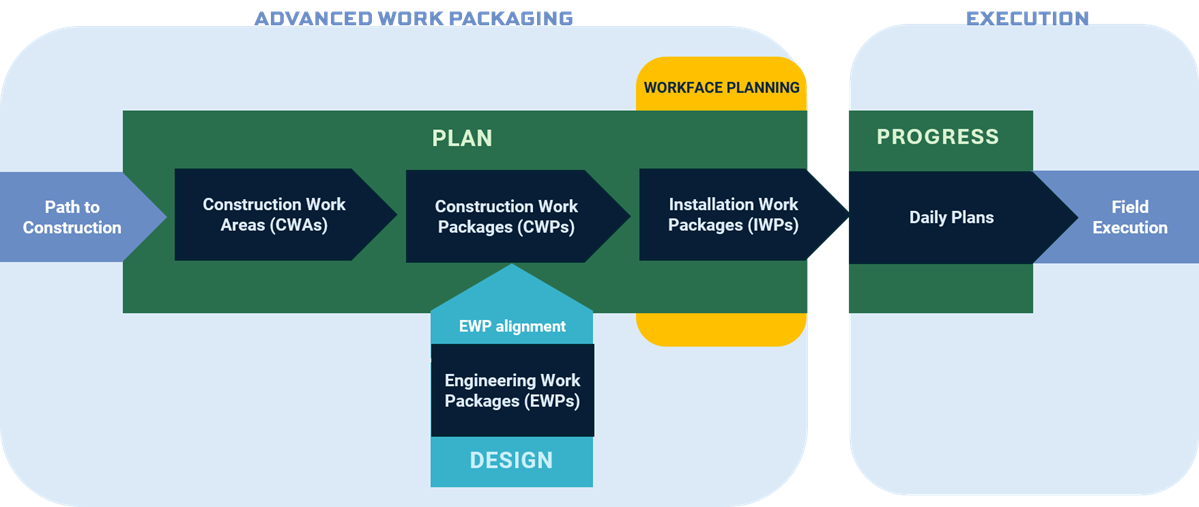
At a high level, the work packaging process follows this progression:
-
Define the path of construction and organize the project into Construction Work Areas.
-
Create Construction Work Packages that define construction scope and execution strategy.
-
Associate Engineering Work Packages from Design to align engineering deliverables with construction requirements.
-
Coordinate engineering, procurement, and construction activities to support package readiness.
-
Develop Installation Work Packages for field execution.
-
Create Progress daily plans from ready-to-execute work packages to support short-term field planning and crew activities.
-
Execute the work in the field and track progress.
Below is a visual representation of the work packaging process including use of InEight products Plan, Design, and Progress.
This structured approach helps move work from long-range planning to field execution. Engineering deliverables, construction planning, procurement activities, work packages, and daily plans stay connected throughout the process, helping project teams improve coordination, address constraints earlier, and deliver work that is ready for execution.